One calendar, every channel.
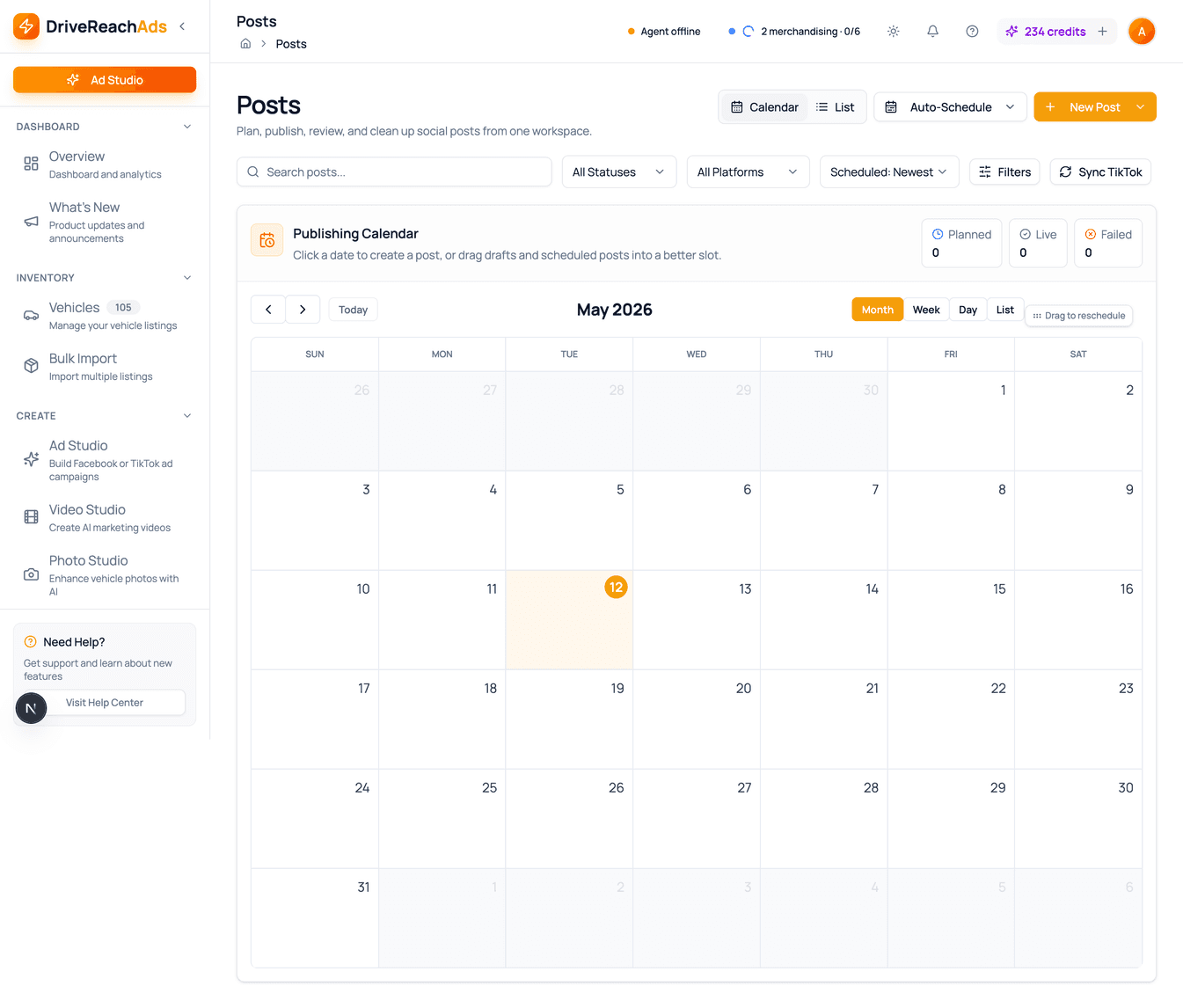
Visual calendar for Facebook, Instagram, TikTok, Craigslist, and Marketplace. Unified composer auto-formats per platform. Failed posts retry themselves. The whole inventory stays visible without daily babysitting.
- Platforms
- 5+ in one calendar
- Views
- Month · Week · Day · List
- Composer
- Write once, auto-formatted per channel
- Reliability
- Auto retries on failure
See every scheduled post on one calendar.
Month, week, and day views — color-coded by platform. Drag a post to move it. If something fails, you'll see it inline with a retry button. Different time zones for different lots? It handles that too.
- Month, week, day, and list views
- Color-coded by platform (Facebook, Instagram, TikTok, Craigslist, Marketplace)
- Drag to reschedule — no edit-and-save dance
- Failed posts highlighted with one-click retry
- Time-zone-aware for multi-location dealerships
- Views
- Month · Week · Day · List
- Reschedule
- Drag and drop
Write once. Post everywhere.
One composer for Facebook, Instagram, TikTok, Craigslist, and Marketplace. Write your copy, drop in vehicle photos or AI-generated media, and we auto-format the post for each platform's quirks. Preview before you schedule.
- Single composer for every platform — no copy-pasting
- Auto-format: trim for TikTok, expand for Craigslist, hashtags for Instagram
- Pull media straight from the shared library
- Per-platform preview before you schedule
- Platforms
- 5+
- Formatting
- Done for you per channel
Marketplace and Craigslist run on a safe desktop agent.
DriveReach AutoPilot is a Mac and Windows app that posts to Facebook Marketplace and Craigslist locally — behaving like a real person. Your accounts stay safe. Your inventory stays visible. And there's no $6+ agency markup.
- Mac and Windows desktop app, included with every plan
- Account-safe posting behavior
- Install on every PC, push from any phone
- Pay Craigslist directly — keep the markup
- Cost
- Included with every plan
- Platforms
- Marketplace · Craigslist
When a post fails, you see why — and retry in one click.
Network blips, platform quirks, expired logins — they all break scheduled posts eventually. Failures show up on the calendar with the platform's reason, and one click retries the post. Nothing is re-posted behind your back, so an interrupted publish can't double-post to your page.
- Failed posts highlighted on the calendar
- Clear error messages when something won’t go through
- One-click retry from the calendar
- Status syncs back so you always know what really posted
- Retries
- One click
- Status
- Always reflects reality
Photos, videos, and copy live in a shared library.
Every AI video, retouched photo, and approved ad copy stays in the library — so the same vehicle's hero shot powers a website page, a Marketplace listing, and an Instagram post without re-uploading anything.
- Shared library across the whole dealership account
- Tag by vehicle, platform, or campaign for fast retrieval
- No duplicate uploads — assets stay in one place
- See exactly which assets are running where
- Sharing
- Across the whole account
- Tags
- Vehicle, platform, campaign
Scheduling questions
Which platforms can I schedule posts to?
Facebook, Instagram, TikTok, Craigslist, and Facebook Marketplace, all from one visual calendar with month, week, day, and list views.
Do I have to write a separate post for each platform?
No. Write once in the unified composer and each post is auto-formatted for its platform — trimmed for TikTok, expanded for Craigslist, hashtags for Instagram — with a per-platform preview before you schedule.
What happens if a scheduled post fails?
It's highlighted on the calendar with the platform's error message and a one-click retry. Posts are never re-published automatically, so an interrupted publish can't create a duplicate on your page.
How many posts can I schedule each month?
Starter includes 10 scheduled social posts a month; Professional and Business include unlimited social scheduling. Marketplace and Craigslist posting through AutoPilot is 50 posts a month on Starter, 200 on Professional, and unlimited on Business.
How do Marketplace and Craigslist posts get published?
Through DriveReach AutoPilot, a Mac and Windows desktop app included with every plan that posts at a human-like pace to keep accounts safe. You pay Craigslist's $5 posting fee directly, with no agency markup.
Stop logging in to five platforms every morning.
Schedule a month of posts in an afternoon. Inventory keeps the content fresh. Retries handle the platform quirks.